



Last Updated: September 2026
An SSD hard drive is the single upgrade that changes how a computer feels more than any other, and it is also the purchase people get wrong most often. There are three completely different products sold under the same words in India: a 2.5 inch SATA drive that drops into an old laptop, an M.2 NVMe stick that slots into a modern board, and a portable SSD that plugs into a USB port. They fit different machines, run at wildly different speeds, and only one of them will actually work in your computer.
We compared the eight SSDs Indian buyers shortlist most often across all three types, and judged them on real sustained speed rather than box claims, physical fit, endurance rating, warranty length inside India, and the rating each has earned on Amazon.in. Where a drive is only worth buying for a specific machine, we say so, because a fast drive in the wrong slot is money that buys you nothing.
Quick Comparison
| Product | Best For | Rating | Link |
|---|---|---|---|
| Crucial BX500 1TB SATA 2.5-inch Internal SSD | Best Overall SSD | 4.5 (1,40,000+) | Check Price |
| Samsung 980 1TB NVMe M.2 Internal SSD | Best NVMe for Most PCs | 4.6 (24,900+) | Check Price |
| Western Digital WD Green 1TB SATA Internal SSD | Best Value SATA SSD | 4.3 (14,300+) | Check Price |
| Crucial P310 1TB PCIe Gen4 NVMe M.2 SSD | Best PCIe Gen4 Drive | 4.6 (5,500+) | Check Price |
| XPG ADATA GAMMIX S70 Blade 1TB PCIe Gen4 NVMe SSD | Best for Gaming PCs | 4.3 (10,900+) | Check Price |
| Acer SA100 240GB SATA III 2.5-inch Internal SSD | Best Budget Small-Capacity SSD | 4.6 (2,300+) | Check Price |
| SanDisk Extreme 1TB Portable External SSD | Best External SSD | 4.5 (81,800+) | Check Price |
| Samsung T7 Shield 1TB Portable SSD | Best Rugged External SSD | 4.6 (2,900+) | Check Price |
Table of Contents
Quick Comparison
1. Crucial BX500 1TB SATA 2.5-inch Internal SSD
2. Samsung 980 1TB NVMe M.2 Internal SSD
3. Western Digital WD Green 1TB SATA Internal SSD
4. Crucial P310 1TB PCIe Gen4 NVMe M.2 SSD
5. XPG ADATA GAMMIX S70 Blade 1TB PCIe Gen4 NVMe SSD
6. Acer SA100 240GB SATA III 2.5-inch Internal SSD
7. SanDisk Extreme 1TB Portable External SSD
8. Samsung T7 Shield 1TB Portable SSD
Buying Guide
FAQs
Related Guides
Best SSD Hard Drive in India — Top 8 Compared
1. Crucial BX500 1TB SATA 2.5-inch Internal SSD


No other storage product sold in India has anything close to this review base, and there is a simple reason for it. The BX500 is the drive that Indian service centres, computer shops and DIY upgraders fit when someone walks in with a five-year-old laptop that takes two minutes to boot. Rated up to 540MB per second read, it is roughly five times faster than the mechanical drive it replaces, and boot time typically drops from over a minute to under fifteen seconds.
It uses the standard 2.5 inch SATA form factor, which fits virtually every laptop made before the ultrabook era and every desktop with a spare bay. Crucial provides a free Acronis cloning licence, so Windows, your programs and your files move across as they are instead of needing a clean reinstall, which is the step that puts most people off upgrading. Crucial is Micron own brand, so the NAND inside comes from one of only a handful of companies in the world that actually manufactures flash memory rather than buying it in.
| Specification | Details |
|---|---|
| Capacity | 1TB |
| Type | Internal SATA SSD (2.5 inch) |
| Read speed | Up to 540 MB/s |
| Interface | SATA 6Gb/s |
| Form factor | 2.5 inch, 7 mm |
| Software | Free Acronis cloning |
| Warranty | 3 years |
Pros
| Cons
|
2. Samsung 980 1TB NVMe M.2 Internal SSD


If your laptop or motherboard has a free M.2 slot that supports NVMe, this is the drive that makes the machine feel genuinely new rather than merely fixed. Rated up to 3500MB per second read and 3000MB per second write, it is around six times quicker than the best SATA drive here and roughly thirty times quicker than a mechanical disk. Large game installs, heavy Photoshop files and virtual machines stop being a waiting game.
Samsung Magician ties the package together, handling firmware updates, drive health monitoring and data migration from one interface, which is more polish than most rivals offer. The 980 is a DRAM-less design that uses Host Memory Buffer, so on very long sustained writes it slows once the cache is exhausted, but for normal desktop and laptop work you will not encounter that. Confirm two things before ordering: that your M.2 slot accepts NVMe and not only SATA M.2, and that there is reasonable airflow, since NVMe drives throttle when they get hot in a cramped chassis.
| Specification | Details |
|---|---|
| Capacity | 1TB |
| Type | Internal NVMe SSD (M.2 2280) |
| Read speed | Up to 3500 MB/s |
| Write speed | Up to 3000 MB/s |
| Interface | PCIe 3.0 x4 |
| Software | Samsung Magician |
| Warranty | 5 years |
Pros
| Cons
|
3. Western Digital WD Green 1TB SATA Internal SSD
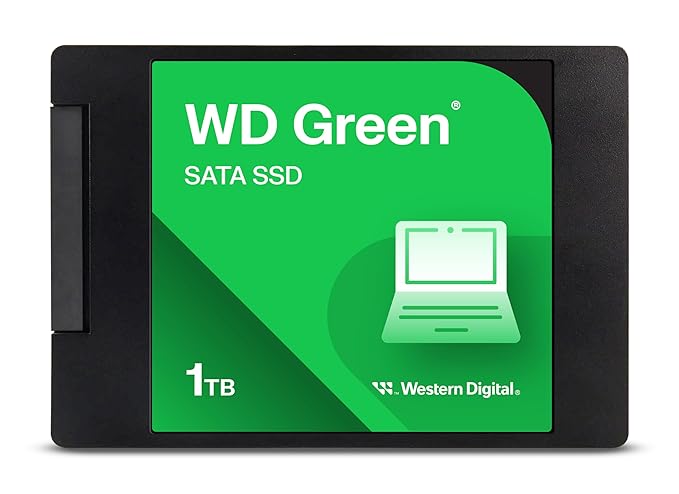

WD Green sits directly opposite the Crucial BX500, and which of the two is the better buy depends entirely on which is cheaper the day you order. Rated up to 545MB per second read, it produces the same practical transformation on an ageing machine: fast boots, applications that open the instant you click, and no more freezing when the browser is holding twenty tabs.
It runs cool and draws noticeably less power than the mechanical drive it replaces, which on a laptop shows up as a small but real gain in battery life. WD SSD Dashboard covers health checks, firmware and secure erase. The honest trade is endurance: WD rates the Green line lower than its Blue and Black families, which is irrelevant for a home or office machine but worth noting if you are building a workstation that writes hundreds of gigabytes every week.
| Specification | Details |
|---|---|
| Capacity | 1TB |
| Type | Internal SATA SSD (2.5 inch) |
| Read speed | Up to 545 MB/s |
| Interface | SATA III |
| Thickness | 7 mm |
| Software | WD SSD Dashboard |
| Warranty | 3 years |
Pros
| Cons
|
4. Crucial P310 1TB PCIe Gen4 NVMe M.2 SSD

For a recent laptop or a motherboard with PCIe Gen4 support, the P310 is the drive that actually uses the bandwidth you paid for. Rated up to 7100MB per second read, it is roughly double the Samsung 980 and about thirteen times a SATA SSD, and it ships in a slim single-sided design that fits the tight M.2 slots on thin laptops where thicker double-sided drives will not seat properly.
It is also one of the more power-efficient Gen4 drives, which matters on a laptop because a hot, thirsty NVMe drive costs you battery and throttles under sustained load. Crucial rates it for 220TB written on the 1TB model, comfortably beyond what a normal user will reach in the drive lifetime. It carries the joint-highest rating of any internal drive here. As with every Gen4 drive, you only see the full speed on a Gen4 slot; on an older Gen3 board it runs at roughly Gen3 speeds, which is still very fast but not the number on the box.
| Specification | Details |
|---|---|
| Capacity | 1TB |
| Type | Internal NVMe SSD (M.2 2280) |
| Read speed | Up to 7100 MB/s |
| Interface | PCIe Gen4 x4 |
| Design | Single-sided, fits slim laptops |
| Endurance | 220 TBW |
| Warranty | 5 years |
Pros
| Cons
|
5. XPG ADATA GAMMIX S70 Blade 1TB PCIe Gen4 NVMe SSD

The S70 Blade is the enthusiast pick, and it earns that with a genuine DRAM cache rather than the host-memory shortcut most mid-range drives use. That shows up exactly where gaming and content work hit hardest: sustained writes and heavy random access, where DRAM-less drives fall off a cliff once their cache fills. Rated up to 7400MB per second read, it is at the top of the Gen4 class.
It ships with a thin aluminium heatspreader already attached, which is the detail that makes it popular for console and small-form-factor builds where there is no room for a chunky tower heatsink. ADATA rates the 1TB model at 740TB written, several times the endurance of a typical consumer drive. Two practical notes: the attached heatspreader means you should check clearance if your motherboard has its own M.2 shield, and the drive runs warm enough that airflow genuinely matters.
| Specification | Details |
|---|---|
| Capacity | 1TB |
| Type | Internal NVMe SSD (M.2 2280) |
| Read speed | Up to 7400 MB/s |
| Interface | PCIe Gen4 x4 |
| Cache | Dedicated DRAM |
| Endurance | 740 TBW |
| Cooling | Slim heatspreader included |
| Warranty | 5 years |
Pros
| Cons
|
6. Acer SA100 240GB SATA III 2.5-inch Internal SSD


Not every upgrade needs a terabyte. If the goal is simply to move Windows off a dying mechanical drive on an old laptop or an office machine, a small SATA SSD as the boot drive with the existing hard disk kept for files is the cheapest way to get almost all of the benefit. That is exactly what the SA100 is for.
At 240GB it holds Windows, Office and a normal set of applications with room to spare, and the boot and launch improvement is identical to a 1TB drive because that comes from the technology, not the capacity. It carries the joint-highest rating in this comparison, which for a budget drive is a good signal. The obvious caution is capacity: it fills quickly if you install games or store media, so treat it as a boot drive and keep bulk storage elsewhere.
| Specification | Details |
|---|---|
| Capacity | 240GB |
| Type | Internal SATA SSD (2.5 inch) |
| Read speed | Up to 560 MB/s |
| Write speed | Up to 500 MB/s |
| Interface | SATA III 6Gb/s |
| NAND | 3D NAND |
| Warranty | 3 years |
Pros
| Cons
|
7. SanDisk Extreme 1TB Portable External SSD


When the SSD needs to move between machines rather than live inside one, this is the drive with the largest following in India. There is nothing to open, nothing to clone and no compatibility question: it plugs into a USB port and works on a laptop, a desktop or a Mac. Rated up to 1050MB per second read, it is roughly ten times a mechanical portable drive, and quick enough to run a photo catalogue or a video edit directly off it.
The rubberised shell, IP55 water and dust resistance and carabiner loop make it the sensible choice for anyone whose drive lives in a bag rather than on a desk. Five years of warranty is the longest here. Two things to know: it needs a USB 3.2 Gen 2 port to reach the rated speed, and it costs several times what the same capacity of internal SATA SSD costs, which is the price of portability rather than a markup on performance.
| Specification | Details |
|---|---|
| Capacity | 1TB |
| Type | Portable external SSD |
| Read speed | Up to 1050 MB/s |
| Interface | USB 3.2 Gen 2 Type-C |
| Water and dust | IP55 rated |
| Encryption | 256-bit AES |
| Warranty | 5 years |
Pros
| Cons
|
8. Samsung T7 Shield 1TB Portable SSD

The T7 Shield is the version of Samsung portable SSD built for people who work outside an office. It wraps the standard T7 internals in a grippy elastomer shell rated IP65, a step above the SanDisk on dust and water ingress, and rated for a three-metre drop. For a drive that goes to shoots, sites and client offices, that is the difference between an inconvenience and a lost project.
Speed matches the class at up to 1050MB per second read and 1000MB per second write, fast enough to edit 4K footage directly from the drive rather than copying it across first. Samsung also fits a heat-management layer that keeps the drive from throttling as quickly during long sustained transfers, which is the most common complaint about slim metal portable SSDs. Both USB-C to C and USB-C to A cables are in the box, so it works on new and old machines without an adapter purchase.
| Specification | Details |
|---|---|
| Capacity | 1TB |
| Type | Portable external SSD |
| Read speed | Up to 1050 MB/s |
| Write speed | Up to 1000 MB/s |
| Protection | IP65, 3 m drop rated |
| Cables | USB-C to C and USB-C to A |
| Warranty | 3 years |
Pros
| Cons
|
How to Choose an SSD Hard Drive
Work out which of the three SSD types your machine takes
A 2.5 inch SATA SSD needs a drive bay and a SATA cable, and fits most laptops made before roughly 2018 plus any desktop. An M.2 NVMe drive needs an M.2 slot on the board. A portable SSD needs only a USB port and works on anything. Check your exact laptop model or open the back panel before ordering, because the wrong type is a return, not an upgrade.
Beware the M.2 slot that only accepts SATA
This trips up more buyers than any other detail. Some laptops and older motherboards have an M.2 slot that is wired for SATA only, not NVMe. An NVMe drive fitted there either will not be detected or will run at SATA speed. Search your model number along with the words M.2 NVMe support before you buy a fast drive for it.
Understand what the speed number actually buys you
Going from a mechanical hard disk to any SSD is a night-and-day change. Going from SATA to NVMe is real but far smaller in daily use, and going from Gen3 to Gen4 NVMe is invisible unless you move very large files for a living. Spend on the first jump, be sceptical about paying a premium for the third.
DRAM or DRAM-less matters if you write a lot
Drives with a dedicated DRAM cache, like the XPG S70 Blade, hold their speed under sustained heavy writes. DRAM-less designs are cheaper and perfectly fine for browsing, office work and gaming, but slow down once their cache fills during very large transfers. Match this to how you actually use the machine rather than to the review headline.
Check the endurance rating only if you are a heavy user
TBW, or terabytes written, is the manufacturer endurance figure. A 1TB consumer drive is typically rated between 200 and 700TBW, and an ordinary user writes perhaps 5 to 10TB a year, so the drive outlives the machine. This number only becomes relevant for video editing rigs, servers or workstations writing continuously.
Budget the capacity honestly
A 240GB SSD holds Windows and applications comfortably and is the cheapest way to revive an old machine, especially if you keep the existing hard disk for files. 500GB is the practical minimum for a single-drive laptop, and 1TB is where things stop being tight if you install games or work with media.
Plan the migration before you order
Moving Windows to a new SSD without reinstalling requires cloning software and, on a laptop with only one bay, a cheap USB-to-SATA adapter or enclosure so both drives are connected at once. Crucial bundles Acronis free. Sorting this out before the drive arrives saves an entire frustrating evening.
Warranty length is the cheapest insurance you can buy
SSD warranties in this list run from three years to five, and the price gap between them is usually small. Since a failed drive takes your data with it, the longer term is worth having. Also remember that a warranty replaces the hardware, never the data, so keep a backup regardless of how new the drive is.
Frequently Asked Questions
Which is the best SSD hard drive in India?
The Crucial BX500 1TB is the best SSD hard drive for most people, because it fits nearly any laptop or desktop with a 2.5 inch bay, includes cloning software and carries the largest review base of any SSD sold in India. If your machine has a free M.2 NVMe slot, the Samsung 980 1TB is the faster choice, and the SanDisk Extreme 1TB is the pick if you want an SSD you can carry between machines.
What is the difference between SATA SSD and NVMe SSD?
A SATA SSD uses the same interface as an old hard disk and tops out around 550MB per second. An NVMe SSD connects directly to the PCIe lanes and reaches 3500MB per second on Gen3 or over 7000MB per second on Gen4. Both feel dramatically faster than a mechanical drive; the difference between them is noticeable mainly when moving very large files.
Will an SSD hard drive fit my laptop?
It depends on the slot, not the brand. Most laptops made before about 2018 have a 2.5 inch bay that accepts a SATA SSD. Newer thin laptops usually have an M.2 slot instead, which needs an M.2 drive, and some M.2 slots support only SATA rather than NVMe. Check your model number or open the back panel before ordering.
How much SSD capacity do I need?
240GB is enough for Windows and applications and works well as a boot drive alongside an existing hard disk. 500GB is the sensible minimum if the SSD will be your only drive. 1TB is comfortable if you install games, work with photos or video, or simply do not want to manage space.
Can I move Windows to a new SSD without reinstalling?
Yes, using cloning software. Crucial bundles a free Acronis licence, and Samsung Magician includes a migration tool. On a laptop with only one drive bay you will also need an inexpensive USB-to-SATA adapter or enclosure so both drives are connected during the clone. Sort this out before the new drive arrives.
How long does an SSD hard drive last?
For normal home and office use, an SSD generally outlasts the computer it is fitted in. Manufacturer endurance ratings for 1TB consumer drives run roughly 200 to 700 terabytes written, while an ordinary user writes perhaps 5 to 10 terabytes a year. Heavy video editing or server workloads are the only cases where the endurance figure becomes a real limit.
Is a portable SSD as good as an internal one?
For speed and convenience, yes, but they solve different problems. A portable SSD needs no installation and works on any machine, which is ideal if the drive moves around. An internal SSD costs far less per gigabyte and makes the computer itself faster, which a portable drive cannot do because Windows still boots from whatever is inside the machine.
Related Guides
Best External Hard Drive in India | Best SSD External Hard Drive in India | Best External Hard Drive for Laptop | Best Hard Disk in India | Best 2TB External Hard Drive in India
Conclusion
The right SSD hard drive is the one that fits your machine, and that question comes before every speed comparison. For the majority of Indian buyers upgrading an existing laptop or desktop, the Crucial BX500 1TB is the safest and most proven choice, with the WD Green 1TB as the value alternative whenever it is the cheaper of the two on the day. If the SSD is going into a small budget or an office machine that only needs Windows to move quickly, the Acer SA100 240GB does that job for the least money.
For a machine with a free M.2 NVMe slot, the Samsung 980 1TB is the balanced pick, the Crucial P310 is the one to buy if your board supports PCIe Gen4, and the XPG GAMMIX S70 Blade is worth its premium for a gaming or content build where sustained write speed genuinely matters. And if the drive needs to travel rather than live inside a machine, the SanDisk Extreme 1TB is the all-rounder and the Samsung T7 Shield the tougher option. Whichever you choose, plan the migration before the drive arrives and keep a backup, because a warranty replaces hardware but never data.
Affiliate Disclosure: As an Amazon Associate, we earn from qualifying purchases. This does not affect the price you pay.