Last Updated: September 2026
The best SSD external hard drive is not simply the one with the biggest number on the box. Every portable SSD quotes a peak read speed, but what you actually feel day to day is sustained write speed once the fast cache fills, how hot the drive gets during a long transfer, and whether your laptop port can even carry the bandwidth the drive is capable of.
This guide sorts that out with drives that are genuinely selling on Amazon India and carry real verified review bases, from the rugged SanDisk Extreme through Samsung T7 and the Crucial X-series. You will also find the practical details that decide whether you are happy six months later: cable quality, USB-C versus USB-A reality on Indian laptops, why a metal body matters during 4K video transfers, and when a mechanical drive is still the smarter buy.
Quick Comparison Table
| Product | Best For | Rating | Buy |
|---|---|---|---|
| SanDisk Extreme 1TB Portable External SSD | Best Overall SSD | 4.5 ⭐ (81,800+) | Check Price |
| Samsung T7 1TB Portable SSD | Best Rated Overall | 4.6 ⭐ (27,100+) | Check Price |
| Samsung T7 Shield 1TB Portable SSD | Best Rugged SSD | 4.6 ⭐ (2,900+) | Check Price |
| Crucial X9 1TB Portable SSD | Best Value SSD | 4.5 ⭐ (7,900+) | Check Price |
| Crucial X10 1TB Portable SSD | Fastest on Paper | 4.6 ⭐ (2,300+) | Check Price |
| SANDISK 1TB Portable SSD with USB 3.2 Gen 2 | Best Entry SanDisk | 4.5 ⭐ (12,200+) | Check Price |
| Seagate One Touch 2TB External SSD | Best 2TB SSD | 4.4 ⭐ (1,700+) | Check Price |
Top 7 Portable SSDs in India Reviewed
1. SanDisk Extreme 1TB Portable External SSD

Among portable SSDs sold in India this is the one that combines speed with genuine ruggedness, and the review count tells you how many people have already made that choice. Rated up to 1050MB per second read and 1000MB per second write, it moves a 50GB video project in about a minute on a proper USB 3.2 Gen 2 port, which is the difference between waiting and working.
What sets it apart from the metal-bodied competition is the rubberised shell and the water and dust resistance, so it tolerates being thrown into a camera bag, taken on shoots and dropped occasionally. The carabiner loop is genuinely useful for clipping it to a bag rather than losing it in a pocket. If you want one SSD that handles both fast editing work and rough handling, this is the safe answer.
| Specification | Details |
|---|---|
| Capacity | 1TB |
| Read speed | Up to 1050MB per second |
| Write speed | Up to 1000MB per second |
| Durability | Water and dust resistant, rubberised body |
| Interface | USB 3.2 Gen 2, USB-C |
| Extra | Carabiner loop for bags |
Pros
| Cons
|
2. Samsung T7 1TB Portable SSD

If ratings are your shortlist filter, the T7 comes out on top with a 4.6 average across tens of thousands of buyers. Samsung makes its own NAND and controllers, which shows up as consistent performance rather than a drive that starts fast and slows dramatically once the cache is exhausted during a long copy.
The aluminium unibody is barely bigger than a credit card and thin enough to disappear in a shirt pocket, and that metal shell doubles as a heatsink, which matters when you are transferring hundreds of gigabytes in one session. It plugs into laptops, Android phones and consoles. The trade-off against the SanDisk is protection: no rubber armour and no IP rating, so it wants a pouch rather than a bare bag.
| Specification | Details |
|---|---|
| Capacity | 1TB |
| Speed | Up to 1050MB per second read |
| Body | Aluminium unibody, credit-card size |
| Thermals | Metal shell acts as a heatsink |
| Interface | USB 3.2 Gen 2, USB-C |
| Works with | Windows, Mac, Android, consoles |
Pros
| Cons
|
3. Samsung T7 Shield 1TB Portable SSD
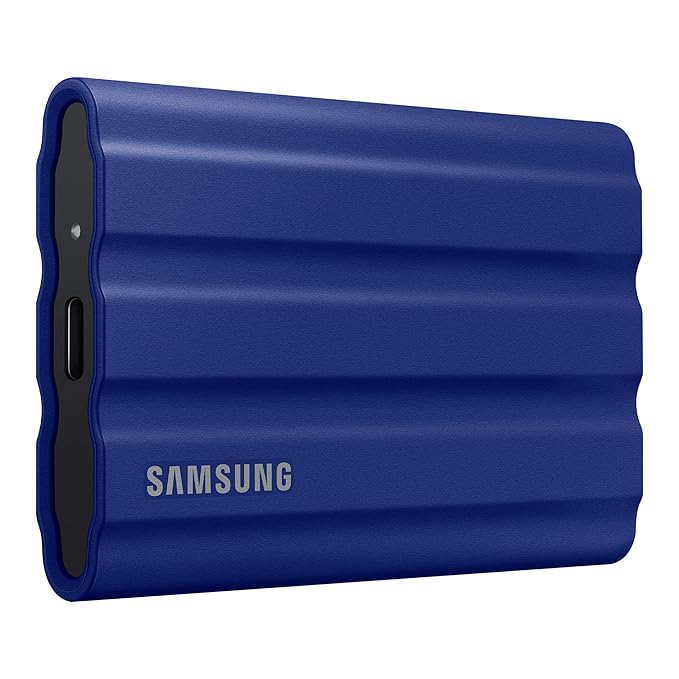
The Shield is what the standard T7 becomes when Samsung expects it to live outdoors. A grippy rubberised exterior wraps the same fast internals, adding water and dust resistance plus drop protection, and the textured surface means it does not slide off a car seat or a table the way the smooth T7 can.
It is aimed at photographers and videographers who offload cards on location, and at anyone whose drive travels more than it sits. Sustained performance holds up better than on the bare T7 during long transfers because the design manages heat with the extra mass. It costs more than the standard model and is slightly bulkier, which is the price of the protection, and it shares the same excellent 4.6 rating.
| Specification | Details |
|---|---|
| Capacity | 1TB |
| Protection | Water and dust resistant, drop resistant |
| Body | Rubberised, textured grip |
| Speed | Up to 1050MB per second read |
| Interface | USB 3.2 Gen 2, USB-C |
| Best for | Location shoots and travel |
Pros
| Cons
|
4. Crucial X9 1TB Portable SSD

The X9 is the drive that makes the value argument for portable SSDs. It gives you the practical benefits, silence, shock resistance and transfer speeds several times faster than any mechanical drive, at a price that sits meaningfully below the flagship models, in a body small enough to forget in a bag.
Crucial is Micron, one of the few companies that actually manufactures the NAND flash inside these drives, so this is not a generic controller wrapped around bought-in memory. For students moving project files, professionals carrying documents and anyone who just wants their backups to finish quickly, the X9 covers the job. Flagship drives are faster on paper, but the gap in everyday use is smaller than the price gap.
| Specification | Details |
|---|---|
| Capacity | 1TB |
| Interface | USB 3.2, USB-C |
| Body | Compact plastic with lanyard hole |
| Brand note | Micron-owned, makes its own NAND |
| Best for | Everyday transfers and backups |
| Weight | Light enough to forget in a bag |
Pros
| Cons
|
5. Crucial X10 1TB Portable SSD

The X10 is Crucial pushing the interface as far as it goes, with quoted speeds up to about 2100MB per second, roughly double what the 1050MB per second generation delivers. That only matters if your laptop has a port fast enough to feed it, so check for USB 3.2 Gen 2×2 or Thunderbolt before paying for the headroom.
Where it pays off is bulk work: offloading a full day of 4K footage, moving a games library, or backing up a large project folder, where halving the transfer time is a real saving. It shares the compact, light Crucial design and carries a 4.6 rating. On an ordinary USB 3.2 Gen 2 laptop port it will behave much like the X9, so buy it for the port you have or plan to have.
| Specification | Details |
|---|---|
| Capacity | 1TB |
| Speed | Up to about 2100MB per second |
| Requirement | Needs a high-bandwidth port for full speed |
| Body | Compact, light plastic |
| Interface | USB-C |
| Best for | 4K video offload and large libraries |
Pros
| Cons
|
6. SANDISK 1TB Portable SSD with USB 3.2 Gen 2

This is the more affordable SanDisk portable SSD, quoted around 800MB per second rather than the Extreme 1050MB per second, and for most buyers that difference is invisible in daily use. It keeps the shock resistance that makes SSDs attractive over mechanical drives while sitting at a friendlier price.
It suits students, office users and anyone moving documents, photos and the occasional video project rather than editing 4K timelines directly off the drive. The build is simpler than the Extreme, so treat it as a bag drive rather than a site drive. With over twelve thousand ratings behind it, it is a well-proven option and the sensible first portable SSD for someone upgrading from an HDD.
| Specification | Details |
|---|---|
| Capacity | 1TB |
| Speed | Up to about 800MB per second read |
| Interface | USB 3.2 Gen 2, USB-C |
| Durability | Shock resistant solid-state design |
| Best for | First portable SSD upgrade |
| Use case | Documents, photos, light video |
Pros
| Cons
|
7. Seagate One Touch 2TB External SSD

Most portable SSDs at sensible prices stop at 1TB, which is a problem if you shoot video or keep a large games library. This One Touch gives you two terabytes of solid-state storage in one unit, quoted around 1030MB per second, so you are not juggling two drives and remembering which project sits on which.
The slim body with a fabric-style finish looks more like a design object than a tool, and it works across Windows, Mac and Android. Doubling capacity means a higher price than the 1TB drives above, and a single larger drive carries more risk than two smaller ones if it fails, so keep a second copy. For creators who need space and speed together, it is the most practical pick here.
| Specification | Details |
|---|---|
| Capacity | 2TB |
| Speed | Up to about 1030MB per second |
| Body | Slim with fabric-style finish |
| Interface | USB 3.2, USB-C |
| Compatibility | Windows, Mac, Android |
| Best for | Video libraries and large game collections |
Pros
| Cons
|
How to Choose the Best SSD External Hard Drive
Check your laptop port before paying for speed
A drive rated at 2100MB per second runs at roughly 1000MB per second on a normal USB 3.2 Gen 2 port and around 400MB per second on an old USB 3.0 port. Look up your laptop specification first. Paying for headroom you cannot use is the most common mistake in this category.
Understand sustained speed versus peak speed
Every portable SSD quotes a peak figure measured on a short burst. Once a large transfer exhausts the fast cache, real write speed drops, sometimes sharply on cheaper drives. If you routinely move fifty gigabytes or more at a time, favour drives from companies that make their own NAND, such as Samsung, SanDisk and Crucial.
Metal bodies handle heat better than plastic
SSDs throttle when they get hot, which is why a long transfer can start fast and slow down. An aluminium shell spreads that heat and keeps speeds more consistent. Plastic-bodied budget drives are fine for everyday file moves but will slow more noticeably during sustained video offloads.
Decide whether you need rugged protection
Rubberised, water and dust resistant drives such as the SanDisk Extreme and Samsung T7 Shield cost more and are slightly bulkier. If the drive travels to shoots, sites or college every day, that protection is worth it. If it moves between a desk and a drawer, a slim metal or plastic body is enough.
Use the supplied cable and keep a spare certified one
Portable SSDs are unusually sensitive to cable quality, and many USB-C cables sold for charging carry no high-speed data lines at all. If your drive suddenly transfers at a fraction of its rated speed, swap the cable back to the original before assuming the drive is faulty.
Match capacity to your workflow, not your budget
1TB suits documents, photos and light video. 2TB is the realistic minimum for regular 4K video work or a large game library. Remember that two 1TB drives spread the risk better than a single 2TB drive, because a failure then costs you half your data rather than all of it.
Format for the machines that will use it
exFAT works across Windows and Mac and is the right choice for a shared drive. NTFS is better if only Windows machines touch it. macOS users working exclusively on Mac can use APFS. Always eject properly, since SSDs still keep data in flight in their cache when you pull the cable.
An SSD is still not a backup on its own
Solid-state drives fail differently from mechanical ones: less often from mechanical wear, but suddenly and with less warning when the controller dies. Keep a second copy on another drive or in the cloud, and plug an archive SSD in every few months rather than leaving it unpowered for years.
Frequently Asked Questions (2026)
Which is the best SSD external hard drive in India?
SanDisk Extreme 1TB is the best all-round portable SSD, combining about 1050MB per second speeds with water and dust resistance and the largest review base in the category. Samsung T7 has the highest rating if you prefer a slim metal body, and Crucial X9 is the value pick for everyday transfers.
Is an external SSD worth it over a normal hard disk?
Yes if you carry the drive or work from it. SSDs are five to ten times faster, silent, and survive drops that would destroy a mechanical drive. If you only need bulk storage that sits at home, a mechanical HDD gives roughly four times the capacity for the same money and remains the better buy.
How fast should an external SSD be?
Around 1000MB per second is the practical sweet spot in 2026 and is what SanDisk Extreme, Samsung T7 and Seagate One Touch SSD deliver. Faster 2000MB per second drives only show their advantage on a USB 3.2 Gen 2×2 or Thunderbolt port, which most Indian laptops still do not have.
Can I run games or edit video directly from an external SSD?
Yes. A 1000MB per second portable SSD is fast enough to edit 4K footage directly and to run most games acceptably, which is exactly what mechanical drives cannot do. For heavy multi-stream editing an internal NVMe drive is still faster, but a good portable SSD removes the copy-first step from your workflow.
Why does my SSD slow down during large transfers?
Two reasons: the fast write cache fills up and the drive falls back to slower sustained speeds, and heat causes thermal throttling. Metal-bodied drives handle the second problem better. Both effects are normal and show up mostly on transfers of fifty gigabytes and more in one go.
Do portable SSDs work with iPhone, Android and PS5?
Recent iPhones with USB-C and Android phones supporting OTG can read and write to exFAT-formatted SSDs directly, which is useful for offloading video. Consoles need their own formatting step and restrict which games can run from external storage. Check the format before assuming a device will mount the drive.
How long does an external SSD last?
For normal consumer use, well beyond five years, since typical write volumes are far below the endurance rating. The bigger practical risk is sudden controller failure, which gives little warning. Treat any single SSD as one copy of your data rather than as the only place it lives.
Related Guides
Best External Hard Drive in India | Best External Hard Drive for Laptop | Best Hard Disk in India | Best SSD Hard Drive in India | Best 2TB External Hard Drive in India
Conclusion
The best SSD external hard drive in India is the SanDisk Extreme 1TB: about 1050MB per second in real use, water and dust resistance for daily carry, and more verified reviews than any other portable SSD on Amazon India. Samsung T7 is the alternative if you want the highest rating and the slimmest metal body, and the T7 Shield adds ruggedness to those internals.
On a budget, Crucial X9 delivers most of the everyday benefit for noticeably less, while the X10 is worth it only if your laptop has a port fast enough to use its extra bandwidth. If you need space as well as speed, Seagate One Touch SSD is the practical 2TB option. Check your port, use the bundled cable, and keep a second copy of anything important.
Affiliate Disclosure: This post contains Amazon affiliate links. If you buy through them, we may earn a small commission at no extra cost to you.