


Last Updated: August 2026
A smart plug with energy monitoring is the cheapest way to find out where your electricity actually goes. Your meter gives you one number at the end of the month for the whole house. A metering plug gives you that number for a single appliance, in real time, and the gap between what people assume and what the plug reports is usually the interesting part.
The picks below were checked against live Amazon India ratings and verified review counts in August 2026, and they are ordered by how usable their data is rather than by feature lists, because almost every plug in this category claims monitoring while only a few present it in a form worth reading. Alongside the reviews you will find how accurate these readings really are, how to convert watts into units and then into money using your own tariff, and which appliances are worth metering first.
If you only need switching rather than measurement, the wider guide to the best smart plug in India includes cheaper options without monitoring.
Quick Comparison Table
| Product | Best For | Rating | Buy |
|---|---|---|---|
| TP-Link Tapo P110 16A Smart Plug | Best Energy Monitoring Overall | 4.5 ⭐ (2,800+) | Check Price |
| Wipro 16A Wi-Fi Smart Plug | Best for Metering Heavy Appliances | 4.2 ⭐ (18,800+) | Check Price |
| Wipro 10A Wi-Fi Smart Plug | Best for Measuring Standby Power | 4.2 ⭐ (7,900+) | Check Price |
| Qubo 10A Wi-Fi and Bluetooth Smart Plug | Best with Offline Bluetooth Control | 3.9 ⭐ (3,900+) | Check Price |
| Havells 16A Wi-Fi Smart Plug | Best Build for Permanent Metering | 4.0 ⭐ (1,600+) | Check Price |
| AZIOT 16A Smart Plug | Best Value 16A Energy Monitor | 4.3 ⭐ (390+) | Check Price |
| HomeMate 16A Wi-Fi Smart Plug | Best for Metering Several Rooms | 4.1 ⭐ (1,400+) | Check Price |
Top 7 Smart Plugs with Energy Monitoring Reviewed
1. TP-Link Tapo P110 16A Smart Plug — Best Energy Monitoring Overall


Almost every plug in this category claims energy monitoring. Very few present it in a form you can act on. The Tapo P110 does, and that is the whole reason it leads this list. Its app separates consumption into today, the last seven days and the last thirty days, and plots usage hour by hour, so a running total becomes a pattern you can read. That is how you discover the geyser is reheating at two in the afternoon, or that the fridge draws more overnight than you assumed.
The 16A rating means it can be moved between light and heavy appliances as your questions change, which matters if you own one plug and want to audit the house appliance by appliance. Connection stability is a quiet strength too, since a plug that drops off Wi-Fi loses data continuity and ruins a month of readings. It works with Alexa and Google Assistant, and the compact body helps on crowded boards. The main constraint is that its wider automation is built around other Tapo devices.
| Specification | Details |
|---|---|
| Current rating | 16A |
| Data granularity | Hourly, 7 day and 30 day views |
| Live readings | Real-time watts |
| Connectivity | Wi-Fi 2.4GHz |
| Voice assistants | Alexa and Google Assistant |
| Best suited to | Auditing any appliance in the house |
Pros
| Cons
|
2. Wipro 16A Wi-Fi Smart Plug — Best for Metering Heavy Appliances

If the appliance you want to measure is a geyser, an air conditioner or a microwave, this is the plug most Indian households have already used to do it. Its 16A rating covers those loads properly, and it reports both live wattage and cumulative units, which is the pairing that actually answers the question people have. Live watts confirm what the appliance draws right now, and the unit counter tells you what that adds up to across a week of ordinary use.
The review base behind it is larger than every other model here combined, which matters for a device left permanently in circuit behind a heavy appliance. Practical touches help too: the plug restores its previous state after a power cut, so a metering setup is not silently interrupted every time the supply blinks, and schedules can be layered on once the data tells you what to change. The app is plain and its refresh can lag, but the numbers it reports are the ones you need.
| Specification | Details |
|---|---|
| Current rating | 16A |
| Readings | Live watts and cumulative units |
| Power cut behaviour | Restores last state |
| Connectivity | Wi-Fi 2.4GHz |
| Voice assistants | Alexa and Google Assistant |
| Best suited to | Geyser, AC, microwave, air cooler |
Pros
| Cons
|
3. Wipro 10A Wi-Fi Smart Plug — Best for Measuring Standby Power

Standby power is invisible by definition, which is exactly why it is worth measuring. A television, set-top box, sound bar or printer sitting idle typically pulls a few watts around the clock, and until you meter it the number is a guess. This 10A plug is the cheapest sensible way to find out, carrying the same energy reporting as the 16A model in a smaller body that fits crowded extension boards without covering the socket beside it.
The usual pattern is to move it around the house for a week at a time, logging each device before deciding what deserves a schedule. Televisions and set-top boxes are usually the first surprises, followed by chargers left permanently connected and water purifiers that run more than expected. Once you know the numbers, the same plug automates the fix with a nightly cut-off. It is not rated for geysers or heaters, so keep it on electronics and light appliances.
| Specification | Details |
|---|---|
| Current rating | 10A |
| Readings | Live watts and cumulative units |
| Form factor | Compact, board friendly |
| Connectivity | Wi-Fi 2.4GHz |
| Voice assistants | Alexa and Google Assistant |
| Best suited to | TV, set-top box, router, chargers, purifier |
Pros
| Cons
|
4. Qubo 10A Wi-Fi and Bluetooth Smart Plug — Best with Offline Bluetooth Control

Energy monitoring depends on a plug staying connected, and in many Indian homes the connection is the weak link. Qubo, from the Hero Group, hedges against that by adding Bluetooth alongside Wi-Fi, so when the broadband drops you can still control the plug from inside the house rather than losing access entirely. Consumption tracking is included, and the plug sits in the same app as the cameras and doorbells from the brand if you already own them.
Its rating is the lowest here, and the reason is consistent in user reports: it is sensitive to weak Wi-Fi and occasionally needs re-pairing, which for a metering device means gaps in the record. In a room with a strong signal it behaves well and the Bluetooth fallback is genuinely useful. In a far corner of a large flat it will frustrate you. Judge it on where you plan to put it rather than on the specification sheet.
| Specification | Details |
|---|---|
| Current rating | 10A |
| Readings | Consumption tracking in app |
| Connectivity | Wi-Fi 2.4GHz plus Bluetooth |
| Offline control | Bluetooth within range |
| Voice assistants | Alexa and Google Assistant |
| Best suited to | Homes with unreliable broadband |
Pros
| Cons
|
5. Havells 16A Wi-Fi Smart Plug — Best Build for Permanent Metering


A plug used for monitoring stays in circuit permanently, which puts a premium on build quality rather than features. Havells approaches this as an electrical manufacturer rather than a gadget brand: the housing is dense, the pins seat firmly in a 16A socket, and the whole unit feels like a wiring accessory. For a device that will sit behind a geyser or air conditioner for years reporting numbers, that solidity is the right priority.
Consumption tracking and usage history are built in, with Alexa and Google Assistant support and straightforward scheduling. The app will not impress anyone coming from Tapo, since there are no scenes and no hourly graphs, but it records what the appliance used and lets you review it. What you are really buying is confidence in the hardware and a service network that exists offline in almost every Indian city, which is not something the online-first brands can match.
| Specification | Details |
|---|---|
| Current rating | 16A |
| Readings | Consumption tracking and history |
| Build | Electrical-grade housing |
| Connectivity | Wi-Fi 2.4GHz |
| Voice assistants | Alexa and Google Assistant |
| Best suited to | Permanent metering on heavy appliances |
Pros
| Cons
|
6. AZIOT 16A Smart Plug — Best Value 16A Energy Monitor
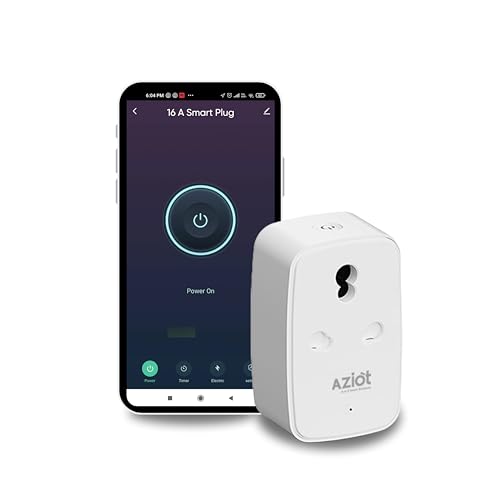
If you want to meter a geyser without paying for a premium brand, this is the most credible value option. It carries a full 16A rating with energy monitoring, adds Bluetooth alongside Wi-Fi so control survives a broadband outage, and runs on the widely used Smart Life app, which lets it share a dashboard with other Tuya-based devices you may already own. For a smaller Indian brand it holds a strong average rating.
The trade-off is evidence. The review base is a fraction of the market leaders, so there is less accumulated data on how it behaves after two or three years in circuit behind a heavy appliance, and the service network is thinner if something does go wrong. Feature for feature it matches plugs costing considerably more, and for a second or third metering plug in a house it makes obvious sense.
| Specification | Details |
|---|---|
| Current rating | 16A |
| Readings | Energy monitoring in Smart Life app |
| Connectivity | Wi-Fi 2.4GHz plus Bluetooth |
| App | Smart Life, Tuya compatible |
| Voice assistants | Alexa and Google Assistant |
| Best suited to | Second or third metering plug |
Pros
| Cons
|
7. HomeMate 16A Wi-Fi Smart Plug — Best for Metering Several Rooms


Auditing a whole house means running several plugs at once, and that is where this model separates itself. Its app supports grouping, so plugs across bedrooms, the kitchen and the bathroom can be handled together rather than as unrelated tiles, and it works with Alexa, Google Assistant and Siri shortcuts so everyone in a mixed-phone household can use it. Energy monitoring is standard, and the 16A rating means the same model covers both a television and a geyser.
HomeMate has been selling home automation in India longer than most of the newer names, and the plug reflects that maturity in its scheduling options, which include both repeating times and countdowns. It is a physically large unit, so check clearance on tight boards, and like every plug here it wants a solid 2.4GHz signal at the socket. For a multi-room metering project rather than a single appliance, it is the most convenient option in this list.
| Specification | Details |
|---|---|
| Current rating | 16A |
| Readings | Energy monitoring per plug |
| Grouping | Multiple plugs managed together |
| Voice assistants | Alexa, Google Assistant and Siri shortcuts |
| Connectivity | Wi-Fi 2.4GHz |
| Best suited to | Whole-home appliance audits |
Pros
| Cons
|
How Smart Plug Energy Monitoring Works
Inside the plug is a small metering chip that samples voltage and current many times a second and multiplies them to produce power in watts. The plug reports that live figure to the app, and separately accumulates it over time to produce energy in kilowatt-hours, which is what your electricity board calls a unit.
The distinction matters because the two answer different questions. Watts tell you what the appliance is doing right now, which is how you catch a geyser element that is still heating when you thought it had finished. Units tell you what the appliance cost you across a day, week or month, which is what you compare against your bill. A plug that reports only one of the two is half a tool.
Because the data is accumulated on the plug and synced to the cloud, a plug that keeps dropping off the network produces a record with holes in it. Connection stability is therefore an energy-monitoring feature, not just a convenience one, and it is the reason the more reliable plugs in this list rank above cheaper units with identical claimed specifications.
How Accurate Are the Readings?
Good domestic metering plugs land within a few percent of a reference meter for steady resistive loads such as heaters, geysers and kettles. That is more than accurate enough for household decisions, where the useful insight is that an appliance uses twice what you expected rather than the third decimal place.
Accuracy degrades in two situations. The first is very small loads. A charger drawing two watts sits near the floor of what these chips resolve, so readings at that level should be treated as indicative. The second is switching loads such as inverter air conditioners and refrigerator compressors, where power fluctuates constantly and a plug sampling at a fixed rate can lag the reality. Cumulative units remain reasonably reliable in both cases even when instantaneous watts jump around.
One thing no plug measures is power factor accuracy across the whole range, so treat these devices as household diagnostic tools rather than as instruments for billing disputes. If your goal is to compare an appliance against itself before and after a change in habit, they are entirely fit for the purpose.
Turning Watts into Units and Money
The conversion is straightforward. Watts multiplied by hours of use, divided by one thousand, gives units. A 2000 watt geyser running for thirty minutes uses one unit. A 10 watt set-top box left on all day uses about 0.24 units, which is roughly 7.2 units a month, all of it for nothing.
To convert units into money, take the per-unit tariff printed on your own electricity bill and multiply. Indian tariffs are slab-based, so the rate rises as monthly consumption climbs, which means savings at the top of your slab are worth more than the average rate suggests. Look for the highest slab rate you actually reach, not the lowest one on the sheet.
The practical method is to meter one appliance for a full week, note the units, multiply by roughly four for a month, then apply your tariff. Do this before changing anything, make one change, and measure again. That before-and-after comparison is where these plugs earn their keep.
Which Appliances to Meter First
Do not start with lights. Start with the appliances that combine high draw with human forgetfulness, because that is where the recoverable waste sits.
| Appliance | Typical Draw | Why It Matters | Priority |
|---|---|---|---|
| Storage geyser | 2000 to 3000 W | High, and often left on unnecessarily | Meter first |
| Air conditioner | 1200 to 2600 W | Largest summer line on most bills | Meter first |
| Refrigerator | 150 to 250 W | Runs continuously all year | Meter first |
| Water pump | 370 to 750 W | Short bursts, easy to overrun | Meter early |
| Television and set-top box | 60 to 150 W active | Standby draw around the clock | Worth checking |
| Water purifier | 25 to 60 W | Repeated small cycles | Worth checking |
| Washing machine | 500 to 2000 W | Depends heavily on heater use | Worth checking |
| Router and modem | 10 to 30 W | Continuous but small | Low priority |
| Phone and laptop chargers | 2 to 65 W | Small, but often left plugged in | Low priority |
| LED lighting | 5 to 40 W | Already efficient | Low priority |
The pattern that emerges in most Indian homes is consistent. The geyser is left on far longer than anyone believes, the air conditioner runs into empty rooms, the refrigerator quietly dominates the annual total because it never stops, and standby draw across entertainment devices adds a small but permanent tax. Metering in that order finds the largest savings fastest.
What Energy Monitoring Cannot Tell You
It cannot measure anything that is hardwired. Ceiling lights, fans on regulators, hardwired geysers and inbuilt hobs have no plug to sit behind, so a plug-in meter never sees them. For those you need a smart switch or a whole-home energy monitor at the distribution board.
It cannot separate two appliances sharing one plug. If a strip with a television, a console and a sound bar sits behind a single metering plug, you get one combined figure. Metering has to be one appliance at a time to be meaningful.
It cannot diagnose a fault by itself, though it often reveals one. A refrigerator whose consumption climbs month after month usually has a failing door seal or a dirty condenser coil, and a geyser drawing power long after it should have cut off may have a stuck thermostat. The plug shows the symptom, and you still need someone to look at the appliance.
Frequently Asked Questions (2026)
Which smart plug has the best energy monitoring in India?
The TP-Link Tapo P110, because it presents consumption hour by hour as well as across seven and thirty day periods, instead of showing only a running total. The Wipro 16A is the strongest alternative for heavy appliances thanks to its very large track record.
Are smart plug energy readings accurate?
For steady loads such as geysers, heaters and kettles they are typically within a few percent of a reference meter, which is ample for household decisions. Accuracy is weaker on very small loads and on rapidly varying loads like inverter air conditioners, though cumulative unit totals stay usable.
Do all smart plugs measure electricity?
No. Many budget models only switch power. Energy monitoring requires a metering chip inside the plug, so check the specification explicitly rather than assuming, since listings often use the words smart and energy loosely.
Can a smart plug reduce my electricity bill?
Indirectly. It shows you which appliances waste power and lets you schedule them off. The saving comes from the change in behaviour, not from the plug, which itself draws under a watt while idle.
How do I convert the readings into rupees?
Multiply the units shown in the app by the per-unit rate on your electricity bill. Because Indian tariffs are slab-based, use the highest slab your household actually reaches, since reductions come off the top of your consumption first.
Does the plug store data if the internet goes down?
Most plugs accumulate a total on the device but rely on the cloud for history, so an outage usually creates a gap in the record. This is why connection reliability matters for a metering plug.
Can I monitor a geyser or an air conditioner?
Yes, with a 16A model. The Wipro 16A, Tapo P110, Havells 16A, AZIOT 16A and HomeMate 16A in this list all carry that rating and can meter heavy appliances safely.
Do these plugs work with Alexa and Google Assistant?
Every model here does, without a hub. Voice assistants can switch the plug, though detailed consumption data still lives in the plug app rather than in the assistant.
How much electricity does the plug itself use?
Typically under one watt while idle, which comes to a fraction of a unit per month. That is far less than the standby power a plug usually helps you eliminate.
Can one plug monitor my whole house?
No. A plug measures only what is connected to it. Whole-home measurement needs a dedicated energy monitor installed at the distribution board by an electrician.
Related Guides
Best Smart Plug in India · Best 16A Smart Plug in India · Best Smart Plug for AC in India · Best Smart LED Bulb in India · Best Smart Plug Under 1000 · Best Smart Plug Brand in India · Best Smart Extension Board
Conclusion
The TP-Link Tapo P110 is the one to buy if measurement is the point. Nothing else in the Indian market turns consumption into something you can actually read, and its 16A rating lets you move it from the television to the geyser as your questions change.
The Wipro 16A is the safer choice for a plug that will live permanently behind a heavy appliance, backed by a far larger body of real-world use, and the Wipro 10A is the cheapest way to hunt down standby draw across your electronics. Add the Qubo if broadband outages are frequent, the Havells if build quality on a permanent installation matters most, the AZIOT as a value second unit, and the HomeMate if you are metering several rooms at once.
Start with the geyser, the air conditioner and the refrigerator. Measure for a week, change one habit, and measure again. That is the entire method, and it is where the savings come from.