


Last Updated: August 2026
A smart extension board solves a problem a single smart plug cannot. Around a television unit or a work desk, four or five devices share one cluster of sockets, and putting an individual plug on each is expensive, ugly and usually impossible because the plugs block each other. A board with individually controlled sockets turns that whole cluster into separate devices you can switch, schedule and automate one by one.
This is a genuinely small category in India, and it is worth saying so plainly: there are perhaps half a dozen boards worth buying, not fifty. All six picks below were checked against live Amazon India listings, ratings and verified review counts in August 2026, and each one offers real per-socket control rather than a single on-off switch for the whole strip.
The most important thing to understand before buying is the combined load rating, which is where most disappointment in this category comes from, and the section below explains it properly. If you only need to control one appliance, a single unit from our guide to the best smart plug in India will be cheaper, and if you want ordinary switches rather than app control, see our guide to extension boards with individual switches.
Quick Comparison Table
| Product | Best For | Rating | Buy |
|---|---|---|---|
| Wipro Smart Wi-Fi Extension Board (4 Socket) | Best Overall | 4.1 ⭐ (1,370+) | Check Price |
| Smarteefi WiFi Smart Power Extension (5 Ports) | Best for Schedules That Survive Outages | 4.6 ⭐ (490+) | Check Price |
| AZIOT 4 Socket Smart Extension | Best Value with Power Monitoring | 4.2 ⭐ (100+) | Check Price |
| Smarteefi 5 Port Smart Power Strip with USB-C | Best for Desks with Charging Needs | 4.6 ⭐ (30+) | Check Price |
| AZIOT 3 Socket Plus USB Smart Extension | Best Compact Board | 4.1 ⭐ (45+) | Check Price |
| T Teclusive 2500W WiFi Smart Extension Power Strip | Best Stated Load Headroom | 4.0 ⭐ (85+) | Check Price |
Top 6 Smart Extension Boards in India Reviewed
1. Wipro Smart Wi-Fi Extension Board (4 Socket) — Best Overall


This is the smart extension board most Indian homes have actually bought, and its review base is several times larger than anything else in a small category. Four universal sockets can be switched independently from the Wipro Next app or by voice through Alexa and Google Assistant, so one board can run a television, a set-top box, a sound bar and a lamp as four separate devices rather than one block of power.
The universal socket design is the practical strength here, accepting both Indian round pins and flat-pin adaptors without hunting for the right outlet, which is exactly what a media unit or a work desk needs. It shares the app with Wipro plugs and bulbs, so a household already using the brand keeps one dashboard and one set of routines. The board carries a combined load rating rather than a per-socket one, so it belongs behind electronics rather than heaters, and the app remains plain compared with global rivals. As a first smart board it is the least risky choice available.
| Specification | Details |
|---|---|
| Sockets | 4 universal, individually controlled |
| Control | Wipro Next app plus voice |
| Voice assistants | Alexa and Google Assistant |
| Scheduling | Per socket schedules and timers |
| Best suited to | TV units, work desks, entertainment setups |
| Connectivity | Wi-Fi 2.4GHz |
Pros
| Cons
|
2. Smarteefi WiFi Smart Power Extension (5 Ports) — Best for Schedules That Survive Outages
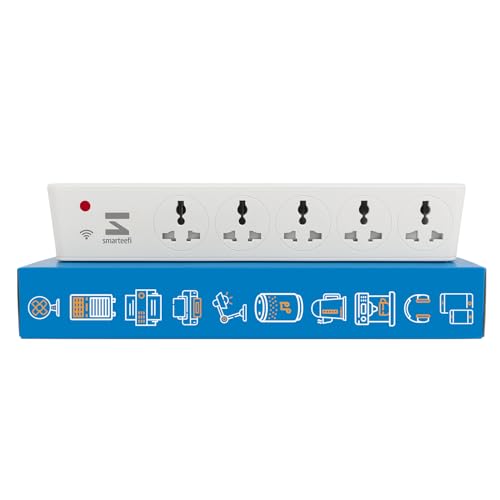
Every cloud-dependent smart board has the same silent failure: when your broadband drops, the schedules simply do not fire and nobody finds out until the device that should have switched on did not. Smarteefi stores schedules on the board itself, so each socket keeps its timing through an internet outage and resumes correctly after a power cut. In a five-socket device running several appliances, that reliability compounds.
Five ports can be programmed and controlled independently through the Smarteefi app or by voice, and energy monitoring is included so you can see what each connected device is drawing rather than the total. It holds the strongest rating in this category. The trade-offs are price, since it sits above the mainstream, and brand scale, since Smarteefi is a niche Indian manufacturer rather than a household name. For a desk or media setup where timing actually matters, it is the most dependable board sold in India.
| Specification | Details |
|---|---|
| Sockets | 5 ports, independently controlled |
| Scheduling | Stored on device, runs without internet |
| Energy monitoring | Yes |
| Voice assistants | Alexa and Google Assistant |
| Power cut behaviour | Schedules resume automatically |
| Best suited to | Setups where timing must not fail |
Pros
| Cons
|
3. AZIOT 4 Socket Smart Extension — Best Value with Power Monitoring

AZIOT builds the same idea as the Wipro board but adds two things at a lower price: power monitoring and a Bluetooth radio alongside Wi-Fi. The monitoring turns the board into a small diagnostic tool for a whole cluster of devices, which is genuinely useful behind a television unit where four devices sit in standby and nobody knows which one is the worst offender. The Bluetooth fallback means you can still switch sockets from your phone inside the house when the connection drops.
Each of the four sockets is controlled individually through the widely used Smart Life app, which also means the board sits alongside any other Tuya-based devices you already own instead of demanding a new dashboard. Voice control works with Alexa and Google Assistant. The honest limitation is evidence: the review base is small, so there is less accumulated data on long-term behaviour than the Wipro board offers, and offline service is thin.
| Specification | Details |
|---|---|
| Sockets | 4, individually controlled |
| Energy monitoring | Yes, power monitoring built in |
| Connectivity | Wi-Fi 2.4GHz plus Bluetooth |
| App | Smart Life, Tuya compatible |
| Voice assistants | Alexa and Google Assistant |
| Best suited to | Media units and shared desks |
Pros
| Cons
|
4. Smarteefi 5 Port Smart Power Strip with USB-C — Best for Desks with Charging Needs

A work desk usually needs two different things from one board: switched sockets for a monitor and a lamp, and fast charging for a phone and a laptop. This model combines four controllable sockets with an 18W USB-C and USB-A charging section, so a single device covers both jobs without a separate charger occupying an outlet.
It carries the same guaranteed scheduling that defines the brand, meaning each socket keeps its timing even when the internet is down, and it works with Alexa and Google Assistant for voice control. The rating is strong although the review base is genuinely small, which reflects how new and how niche this specific variant is. Note that the USB section is a charging output rather than a smart socket, so it is not individually switchable in the app. As a desk board it is the most complete option in the category.
| Specification | Details |
|---|---|
| Sockets | 4 controllable plus USB-C and USB-A |
| USB output | 18W fast charging |
| Scheduling | Guaranteed, runs offline |
| Voice assistants | Alexa and Google Assistant |
| Best suited to | Work desks and study tables |
| Connectivity | Wi-Fi 2.4GHz |
Pros
| Cons
|
5. AZIOT 3 Socket Plus USB Smart Extension — Best Compact Board

Not every corner needs four sockets. This compact AZIOT board pairs three individually controlled outlets with three USB ports, which suits a bedside table, a small study desk or a kitchen counter far better than a full-size strip that ends up half empty. Power monitoring is included, as is Bluetooth alongside Wi-Fi for control when the broadband fails.
Control runs through the Smart Life app, so each of the three sockets can be scheduled and switched separately, and voice control through Alexa and Google Assistant works without a hub. The USB section handles charging rather than smart switching. As with the larger AZIOT board, the caveat is scale: this is a newer product with a modest review base, so it carries less accumulated evidence than the established options. For a compact location where three smart sockets is exactly right, it fills a gap nothing else in India covers well.
| Specification | Details |
|---|---|
| Sockets | 3 controllable plus 3 USB ports |
| Energy monitoring | Power monitoring included |
| Connectivity | Wi-Fi 2.4GHz plus Bluetooth |
| App | Smart Life |
| Voice assistants | Alexa and Google Assistant |
| Best suited to | Bedside tables and small desks |
Pros
| Cons
|
6. T Teclusive 2500W WiFi Smart Extension Power Strip — Best Stated Load Headroom

Most smart extension boards quietly avoid publishing a total load figure, which is unhelpful because the combined rating is the number that determines what you can safely plug in. This board states 2500W openly, which is more headroom than the category norm and makes it easier to plan a setup without guessing. It combines individually controlled power sockets with Type-C and USB-A charging ports.
Control runs through the Smart Life app, so it joins the same dashboard as other Tuya-based devices, with scheduling and voice control through Alexa and Google Assistant. The rating is respectable rather than outstanding and the review base is modest, so treat it as a capable secondary option rather than a first recommendation. Even with a higher stated rating, the sensible practice with any board remains the same: keep heaters, geysers and irons off it entirely and use a wall-mounted 16A plug for those.
| Specification | Details |
|---|---|
| Stated load | 2500W combined |
| Sockets | Individually controlled power sockets |
| USB | Type-C and USB-A charging |
| App | Smart Life |
| Voice assistants | Alexa and Google Assistant |
| Best suited to | Setups that need more combined headroom |
Pros
| Cons
|
What a Smart Extension Board Actually Does
An ordinary extension board splits one socket into several. A smart extension board does the same thing, but each socket is also an independently controlled switch that appears as its own device in an app and to a voice assistant. The board is one physical object and four or five logical devices.
That distinction is what people miss when comparing listings. Plenty of boards are sold as smart because they have a single Wi-Fi switch controlling the entire strip, which makes them a large, expensive smart plug rather than a smart board. Every product in this guide offers genuine per-socket control, and that is the feature to verify before buying anything not on this list.
The practical result is that a media unit becomes four separate things you can automate. The set-top box can be cut overnight while the router beside it stays on. The console can be switched off from your phone when the children forget. A festive lighting string can run on a sunset schedule while the lamp next to it runs on a different one. None of that is possible with a single-switch strip.
The Load Rating Trap Nobody Explains
Here is the detail that causes most regret in this category. A smart plug has one rating and one appliance. A smart extension board has a combined rating shared across every socket, and it is usually far lower than four times a single plug rating.
Most smart boards sold in India are built around a total of roughly 2000 to 2500 watts, which is about ten amps for the whole board. That is comfortable for a television, a set-top box, a sound bar, a router, a lamp, a laptop charger and a phone charger all at once, because those devices together draw a few hundred watts. It is not comfortable for a kettle and a toaster on the same board, and it is entirely wrong for a geyser, an air conditioner, a room heater or an iron, any one of which can consume the board budget by itself.
The rule to carry away is simple. Smart extension boards are for clusters of small electronics. Heavy appliances belong on a 16A smart plug pushed directly into a wall socket, never on a board and never through an adaptor. Adding up the wattage of everything you intend to connect, and keeping the total under about eighty percent of the stated board rating, takes two minutes and prevents the only serious failure mode this category has.
Smart Board or Several Smart Plugs?
Buy a smart extension board when the devices are clustered, small, and share one wall socket. A television unit is the classic case: four devices, one outlet, and individual plugs would physically obstruct each other even if you bought them.
Buy individual smart plugs when the appliances are spread across rooms, when any of them is heavy, or when you want energy monitoring per appliance from a brand with a longer track record. A geyser, an air conditioner and a washing machine in three different rooms need three plugs, not a board.
Cost usually favours the board once you pass three devices in one place, and it certainly favours the board on tidiness. Reliability slightly favours plugs, because the single most popular smart plugs have far larger review bases than any smart board sold in India. And there is one risk worth naming: a board is a single point of failure for four devices, whereas four plugs fail independently.
Where a Smart Board Makes Sense
The table below sets out where these boards belong and where they do not.
| Location | Typical Devices | Smart Board Suitable | Notes |
|---|---|---|---|
| Television unit | Set-top box, sound bar, console, TV | Yes, ideal | Standby draw across four devices |
| Work desk | Monitor, laptop charger, lamp, speakers | Yes, ideal | USB ports free an outlet |
| Study table | Lamp, charger, router | Yes | Compact three-socket boards suit this |
| Bedside | Lamp, phone charger, alarm | Yes | Compact board is enough |
| Festive lighting | Multiple light strings | Yes | One board schedules all strings |
| Kitchen counter | Kettle, toaster, mixer | Caution | Combined load adds up quickly |
| Bathroom geyser | Water heater | No | Use a 16A wall plug instead |
| Bedroom AC | Air conditioner | No | Never put an AC on any board |
| Utility area | Washing machine, iron | No | Both exceed board ratings |
Read the bottom three rows as absolute rather than cautious. Geysers, air conditioners, irons and washing machines are not marginal cases for a smart board, they are outside its design entirely, and no stated wattage figure changes that.
How to Choose a Smart Extension Board
Confirm per-socket control. This is the whole point. If the listing does not explicitly say each socket is individually controlled, assume the board has one switch for everything.
Check the combined load rating and add up your devices. A published figure is a good sign in itself, since many sellers avoid printing one.
Count sockets honestly. A five-port board where one port is a USB charging section is a four-socket board. Compact three-socket models are often the right answer for bedsides and study tables.
Decide whether schedules must survive an outage. Boards that store schedules on the device keep working when broadband fails. Cloud-only boards silently stop, which matters more on a board running several devices.
Look at cord length and socket spacing. Boards live behind furniture, and a short cord or tightly packed sockets ruin an otherwise good product once bulky adaptors are involved.
Prefer a brand with an Indian warranty entity. This is a live electrical device carrying several appliances, and accountability matters more than a slightly lower price.
Frequently Asked Questions (2026)
What is a smart extension board?
It is an extension board where each socket can be switched, scheduled and voice-controlled independently through an app. One physical board behaves as four or five separate smart devices, unlike an ordinary strip that has a single switch for everything.
Which is the best smart extension board in India?
The Wipro four-socket board for most homes, because it has by far the largest review base in a small category and individually controlled universal sockets. The Smarteefi five-port board is better if you need schedules that keep running during internet outages.
Can I plug a geyser or an air conditioner into a smart extension board?
No. Boards carry a combined rating of roughly 2000 to 2500 watts across all sockets, and a geyser or air conditioner can exceed that alone. Heavy appliances belong on a 16A smart plug in a wall socket.
Can each socket be controlled separately?
On every board in this guide, yes. Many products marketed as smart strips have only one Wi-Fi switch for the whole board, so verify per-socket control explicitly before buying anything not listed here.
Do smart extension boards work with Alexa and Google Assistant?
All six here do, without a hub. Each socket appears as its own device, so you can name them individually and include them in routines and room groups.
Is a smart board better than buying several smart plugs?
It is better when devices are clustered in one place, such as a television unit or a desk, where individual plugs would block each other. Separate plugs are better for appliances spread across rooms or for anything heavy.
Do these boards have surge protection?
Some include basic protection, but it varies by model and is often modest. If you are protecting expensive electronics in an area with unstable supply, treat surge protection as a separate purchase rather than assuming the board covers it.
Can I use a smart extension board with a computer or gaming setup?
Yes, and it is one of the better uses. A monitor, console, speakers and charger draw modest power, and per-socket control lets you cut standby on the ones that waste it without shutting down the whole desk.
Do the USB ports on these boards work like smart sockets?
No. USB sections are charging outputs and are not individually switchable in the app. Only the AC sockets are controllable.
What happens to the board during a power cut?
Nothing runs while power is out. When supply returns, most boards restore their previous per-socket states. Boards with on-device scheduling also resume their timers correctly, while cloud-only boards depend on the internet coming back too.
Related Guides
Best Smart Plug in India · Best 16A Smart Plug in India · Best Smart Plug Under 1000 · Best Smart Plug Brand in India · Extension Boards with Individual Switches
Conclusion
The Wipro four-socket board is the right first purchase for most Indian homes. It has the largest body of real user feedback in this category, its universal sockets accept whatever you own, and every socket switches independently from one app you may already be using for Wipro plugs and bulbs.
Choose the Smarteefi five-port board if schedules failing during an outage would actually matter, the AZIOT four-socket if you want power monitoring at a lower price, the Smarteefi USB-C model for a desk that also needs fast charging, the compact AZIOT three-socket for a bedside or small table, and the T Teclusive if you want a clearly published load figure.
Whichever you pick, add up the wattage of everything you plan to connect and keep it well inside the board rating. And keep the geyser, the air conditioner and the iron off it entirely, no matter how many sockets are free.