The best tablet for drawing in India in 2026 combines a responsive stylus, a smooth low-latency screen and enough power to run creative apps, giving artists and note-takers a natural digital canvas. Whether you sketch, paint, illustrate or take handwritten notes, the right tablet with a good pen feels close to paper while adding layers, undo and endless colours.
To build this list we compared the best tablets for drawing and note-taking on Amazon India, focusing on stylus support and quality, screen size and smoothness, pressure sensitivity, performance in art apps and thousands of verified reviews. We included Apple iPads, Android tablets with bundled pens and even a dedicated e-paper writing tablet, so there is a pick for every kind of creator.
Below are the eight best tablets for drawing and note-taking in India for 2026, from affordable models with a free stylus to premium canvases for professional art. Whether you are a student, hobbyist or professional artist, these are the top tablets to bring your sketches, notes and ideas to life.
Our Top Pick for Drawing
The Xiaomi Pad 8 Creator’s Edition is our pick for the best tablet for drawing in India, bundling the precise Focus Pen Pro for a natural, low-latency writing and sketching experience. Its smooth 144Hz display keeps strokes fluid, a capable chip runs creative apps well, and generous storage holds all your artwork, all at a value price that makes digital art accessible to everyone.
Best Tablets for Drawing at a Glance
| Product | Rating | Best For |
| Xiaomi Pad 8 Creator’s Edition | 4.2 ★ | Best value for drawing |
| Samsung Galaxy Tab S10 Lite | 4.6 ★ | Best for handwritten notes |
| Apple iPad Air 11-inch (M3) | 4.6 ★ | Best for professional art |
| Apple iPad 11-inch (A16) | 4.6 ★ | Best iPad for drawing value |
| OnePlus Pad 2 (12.1-inch) | 4.3 ★ | Best big-screen Android canvas |
| Lenovo Idea Tab Pro (12.7-inch) | 4.4 ★ | Best big canvas value |
| Redmi Pad 2 (11-inch) | 4.2 ★ | Best budget for note-taking |
| reMarkable 2 E-Paper Tablet | 4.2 ★ | Best for distraction-free notes |
The 8 Best Tablets for Drawing Reviewed
Xiaomi Pad 8 Creator’s Edition

| Display | 11-inch 144Hz |
| Processor | Snapdragon |
| Storage | 8GB + 256GB |
| Battery | 8850mAh |
| Stylus | Focus Pen Pro included |
| Standout | Pen + smooth screen |
The Xiaomi Pad 8 Creator’s Edition is the best value tablet for drawing in India, bundling the precise Focus Pen Pro so you can start creating straight away. Its 11-inch display with a smooth 144Hz refresh rate keeps strokes fluid and responsive, which is essential for natural sketching and handwriting, and the capable Snapdragon chip with 8GB of RAM runs art apps and multi-layer work smoothly. Generous 256GB of storage holds plenty of artwork and projects, and the 8850mAh battery lasts through long creative sessions. For students, hobbyists and note-takers who want a responsive stylus experience and lots of storage without a premium price, the Pad 8 Creator’s Edition is an outstanding, well-equipped drawing tablet.
Pros
- Focus Pen Pro included
- Smooth 144Hz display for strokes
- Generous 256GB storage
- Excellent value for creators
Cons
- HyperOS has a learning curve
- Fewer pro apps than iPadOS
- Updates shorter than Samsung
Samsung Galaxy Tab S10 Lite
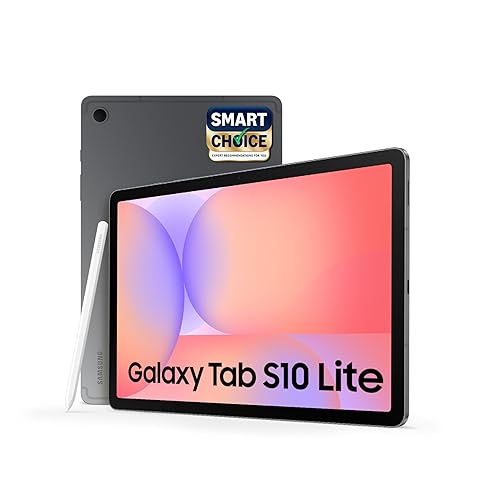
| Display | 10.9-inch |
| Processor | Exynos |
| Storage | 6GB + 128GB |
| Battery | 8000mAh |
| Stylus | S Pen in box |
| Standout | Free responsive pen |
The Samsung Galaxy Tab S10 Lite is the best tablet for handwritten notes and sketching, thanks to its included S Pen, one of the most responsive styluses in the Android world. The pen has low latency and good pressure sensitivity, making writing, diagrams and quick sketches feel natural, and Samsung Notes is a powerful free app for organising everything. The 10.9-inch display is crisp and comfortable for long sessions, One UI is polished and well-supported, and the 8000mAh battery lasts the day. Samsung’s wide service network adds peace of mind. For note-takers and casual artists who want a genuine digital notebook with a free, high-quality pen, the Tab S10 Lite is superb.
Pros
- Responsive S Pen included free
- Great for notes and sketches
- Polished, long-supported software
- Strong Samsung service network
Cons
- Exynos chip trails top Snapdragons
- 6GB RAM modest for heavy art
- Greyscale-free but not pro-grade colour
Apple iPad Air 11-inch (M3)

| Display | 11-inch Liquid Retina |
| Processor | Apple M3 |
| Storage | 128GB to 1TB |
| Battery | All-day |
| Stylus | Apple Pencil Pro support |
| Standout | Procreate + M3 power |
The Apple iPad Air (11-inch, M3) is the best tablet for professional drawing and illustration, pairing Mac-class M3 power with support for the excellent Apple Pencil Pro. It runs professional art apps like Procreate flawlessly, handling large, multi-layer canvases without slowdown, and the Apple Pencil Pro offers superb pressure sensitivity, tilt and low latency for precise, expressive strokes. The 11-inch Liquid Retina display is bright and colour-accurate, which matters for serious art, and iPadOS has the deepest library of creative apps. Battery life lasts a full working day. For artists and designers who want the best drawing experience and app ecosystem in a portable tablet, the iPad Air M3 is the top choice.
Pros
- Powerful M3 chip for art apps
- Apple Pencil Pro support
- Best creative app library
- Colour-accurate Liquid Retina display
Cons
- Apple Pencil Pro sold separately
- No expandable storage
- Pricier than Android rivals
Apple iPad 11-inch (A16)

| Display | 11-inch Liquid Retina |
| Processor | Apple A16 |
| Storage | 128GB to 512GB |
| Battery | All-day |
| Stylus | Apple Pencil support |
| Standout | Affordable iPad art |
The Apple iPad (11-inch, A16) is the most affordable way into the excellent iPad drawing ecosystem, making it a great choice for hobbyist artists and students. Its fast A16 chip runs popular art apps like Procreate smoothly, and the bright 11-inch Liquid Retina display is sharp and pleasant for sketching and note-taking. With Apple Pencil support, you get low-latency, pressure-sensitive strokes that feel natural, and iPadOS offers the widest range of creative apps. Battery life lasts all day, and years of updates keep it useful. For anyone who wants the polished iPad drawing experience and app library without paying Air or Pro prices, the standard iPad is an excellent, well-rounded pick.
Pros
- Runs Procreate and top art apps
- Sharp Liquid Retina display
- Affordable entry to iPad art
- Years of software updates
Cons
- Apple Pencil sold separately
- A16 less powerful than M-series
- No expandable storage
OnePlus Pad 2 (12.1-inch)

| Display | 12.1-inch 3K 144Hz |
| Processor | Snapdragon 8 Gen 3 |
| Storage | 12GB + 256GB |
| Battery | 9510mAh |
| Stylus | Stylo 2 support |
| Standout | Huge 3K canvas |
The OnePlus Pad 2 offers a huge, gorgeous canvas for drawing, with a large 12.1-inch 3K display and a smooth 144Hz refresh rate that keeps strokes fluid. The extra screen space is a real advantage for detailed illustration and note-taking, and the flagship Snapdragon 8 Gen 3 chip with 12GB of RAM handles the most demanding art apps and multi-layer projects with ease. It supports the OnePlus Stylo 2 pen for natural, responsive drawing, and the huge 9510mAh battery lasts through marathon creative sessions. For artists who want the biggest, most powerful Android canvas without an iPad, the Pad 2 is an outstanding choice that pairs a stunning screen with serious power.
Pros
- Large 12.1-inch 3K 144Hz canvas
- Powerful Snapdragon 8 Gen 3
- Huge 9510mAh battery
- Stylus support for drawing
Cons
- Stylus sold separately
- Large size less portable
- Fewer pro apps than iPadOS
Lenovo Idea Tab Pro (12.7-inch)

| Display | 12.7-inch 3K |
| Processor | MediaTek Dimensity |
| Storage | 8GB + 256GB |
| Battery | 10200mAh |
| Stylus | Pen support |
| Standout | Large 3K screen |
The Lenovo Idea Tab Pro gives artists and note-takers a large 12.7-inch 3K canvas at a value price, making detailed drawing and split-screen study comfortable. The expansive, sharp display is excellent for illustration, diagrams and reading, and it comes with pen support for natural handwriting and sketching. A capable MediaTek Dimensity chip with 8GB of RAM keeps art apps and multitasking smooth, and the enormous 10200mAh battery lasts through very long creative sessions. Quad JBL speakers are a bonus for entertainment breaks. For creators who want a big, immersive canvas for drawing and notes without a flagship price, the Idea Tab Pro is an excellent, well-rounded choice with plenty of room to work.
Pros
- Large 12.7-inch 3K canvas
- Pen support for drawing and notes
- Huge 10200mAh battery
- Great value big-screen option
Cons
- Software support shorter than Apple
- Pen best for notes over pro art
- Large size less portable
Redmi Pad 2 (11-inch)

| Display | 11-inch 2.5K |
| Processor | MediaTek Helio G100 |
| Storage | 6GB + 128GB |
| Battery | 9000mAh |
| Stylus | Pen support |
| Standout | Affordable pen input |
The Redmi Pad 2 is the best budget tablet for drawing and note-taking, offering a big, sharp screen and pen support at an affordable price. Its 11-inch 2.5K display is bright and detailed for sketching, writing and reading, and active pen support turns it into a digital notebook for handwritten notes and simple illustrations. The MediaTek Helio G100 chip with 6GB of RAM handles note-taking and lighter art apps smoothly, and the huge 9000mAh battery lasts through long sessions. A microSD slot stores plenty of artwork. Backed by Xiaomi HyperOS and a wide service network, the Redmi Pad 2 makes digital note-taking and casual drawing accessible to everyone on a tight budget.
Pros
- Affordable with pen support
- Sharp 11-inch 2.5K display
- Huge 9000mAh battery
- Expandable storage for artwork
Cons
- Entry chip for heavy art apps
- Pen may cost extra
- 6GB RAM limits complex layers
reMarkable 2 E-Paper Tablet

| Display | 10.3-inch E Ink |
| Type | E-paper writing |
| Storage | 8GB |
| Battery | Weeks of use |
| Stylus | Marker pen |
| Standout | Paper-like, no apps |
The reMarkable 2 is a dedicated e-paper tablet built purely for distraction-free writing, note-taking and sketching, and it is unmatched at that one job. Its 10.3-inch E Ink display looks and feels remarkably like real paper, with almost no lag when you write, and because it has no apps, email or notifications, there is nothing to distract you from your notes and ideas. The battery lasts weeks rather than hours, it is thin and light to carry everywhere, and the marker pen feels natural for handwriting and marking up documents. It is greyscale and not for colourful digital art, but for focused writers, students and thinkers who want a pure paper-like experience, the reMarkable 2 is superb.
Pros
- Paper-like E Ink writing feel
- Zero distractions, no apps
- Battery lasts for weeks
- Thin, light and portable
Cons
- Greyscale, not for colour art
- No general apps or browsing
- Marker and folio add to cost
How to Choose the Best Tablet for Drawing
Stylus quality and latency: The pen is everything for drawing. Look for a stylus with high pressure sensitivity, tilt support and low latency so strokes appear instantly and respond to how hard you press. Bundled pens like Samsung’s S Pen and Xiaomi’s Focus Pen save money, while the Apple Pencil Pro offers the best experience for iPads. A responsive pen makes drawing feel natural and precise.
Screen size and smoothness: A larger screen gives you more room to draw, while a high refresh rate of 120Hz or more keeps strokes silky smooth. A sharp, colour-accurate display matters for art, so look for a 2K or higher resolution. A matte screen or paper-like protector can add pleasant texture for writing and sketching, reducing glare and slipperiness.
Performance and apps: Drawing apps can be demanding, so a capable chip with at least 6GB to 8GB of RAM keeps complex, multi-layer artwork smooth. iPads run professional apps like Procreate, while Android tablets offer strong free and paid options. Check that your preferred art app is available on the platform. Our best tablet in India guide compares overall performance across models.
Purpose, from notes to pro art: Match the tablet to your needs. For distraction-free handwritten notes, a dedicated e-paper tablet like the reMarkable 2 is superb. For colourful digital art, a bright, powerful tablet with a great pen is ideal. For professional illustration, an iPad Air or Pro with the Apple Pencil Pro delivers the best results. Choose the drawing tablet that fits your art style and budget.
Frequently Asked Questions
Which is the best tablet for drawing in India?
The Xiaomi Pad 8 Creator’s Edition is the best value tablet for drawing in India, with an included Focus Pen and smooth 144Hz screen. For handwritten notes the Samsung Galaxy Tab S10 Lite includes an S Pen, while the Apple iPad Air with Apple Pencil Pro is best for professional art. The best drawing tablet depends on your budget and whether you sketch, illustrate or take notes.
Do drawing tablets come with a stylus?
Many drawing tablets include a stylus in the box, such as the Samsung Galaxy Tab S10 Lite with its S Pen and the Xiaomi Pad 8 Creator’s Edition with its Focus Pen. Apple iPads support the Apple Pencil, which is sold separately. Always check whether the pen is included, since a bundled stylus saves money and is ready to use out of the box.
Is an iPad or Android tablet better for drawing?
iPads are excellent for professional drawing thanks to apps like Procreate and the responsive Apple Pencil Pro, making them the choice for serious artists. Android tablets offer great value, bigger screens and often a bundled pen, ideal for students, hobbyists and note-takers. Choose an iPad for pro art and app quality, or an Android tablet for value and a free stylus.
Are e-paper tablets good for note-taking?
Yes, e-paper tablets like the reMarkable 2 are superb for distraction-free handwritten notes and reading, with a paper-like screen that is easy on the eyes and has no apps to distract you. They are not for colourful drawing, since the screen is greyscale, but for writing, sketching ideas and marking up documents, they offer a focused, natural, notebook-like experience.
Final Verdict
The best tablet for drawing in India in 2026 depends on your art and budget. The Xiaomi Pad 8 Creator’s Edition is our value winner with its included pen, the Samsung Galaxy Tab S10 Lite is ideal for note-taking with its free S Pen, and the Apple iPad Air with Apple Pencil Pro is best for professional illustration. For distraction-free writing, the reMarkable 2 e-paper tablet is unmatched.
Whichever you choose, prioritise a responsive stylus, a smooth high-refresh screen and enough power for your art apps. A great drawing tablet turns your ideas into art and notes with the freedom of digital tools, making it a rewarding creative companion for students, hobbyists and professionals alike.