


Last Updated: September 2026
A hard disk purchase in India usually starts with one of two problems: the laptop is full and slow, or the photos and files have outgrown the machine entirely. Those need different answers. The first is solved by an internal drive that replaces or supplements what is inside the computer, the second by an external hard drive that plugs in and holds everything you are not using today. Shopping for both under the same search term is why so many people end up with the wrong one.
This comparison covers both. We looked at the internal SATA and NVMe drives that actually revive an ageing laptop or desktop, and the portable external hard drive options that add a terabyte or two of space without opening the machine. Each pick was judged on real capacity per rupee, sustained speed, warranty length and service reach inside India, and the rating it has earned from tens of thousands of Amazon.in buyers rather than from a spec sheet.
Quick Comparison Table
| Product | Best For | Rating | Buy |
|---|---|---|---|
| Western Digital WD Elements 2TB Portable Hard Disk | Best Overall Hard Disk | 4.4 ⭐ (1,00,000+) | Check Price |
| Crucial BX500 1TB SATA 2.5-inch Internal SSD | Best Internal Upgrade | 4.5 ⭐ (1,40,000+) | Check Price |
| Seagate Expansion 1TB Portable External Hard Disk | Best Budget Hard Disk | 4.3 ⭐ (38,000+) | Check Price |
| Samsung 980 1TB NVMe M.2 Internal SSD | Best Internal NVMe Drive | 4.6 ⭐ (24,900+) | Check Price |
| Western Digital WD My Passport 2TB Portable Hard Disk | Best Secure Hard Disk | 4.4 ⭐ (46,000+) | Check Price |
| Western Digital WD Green 1TB SATA Internal SSD | Best Value Internal SSD | 4.3 ⭐ (14,300+) | Check Price |
| TOSHIBA Canvio Basics 1TB Portable External Hard Disk | Best Simple Storage Drive | 4.3 ⭐ (23,000+) | Check Price |
| SanDisk Extreme 1TB Portable SSD | Best Portable SSD | 4.5 ⭐ (81,800+) | Check Price |
Best Hard Disk in India — Top 8 Picks Compared
1. Western Digital WD Elements 2TB Portable Hard Disk


If you want one hard disk that solves the space problem without touching the inside of your computer, this is the default answer in India and has been for years. Two terabytes is roughly four times what a typical laptop ships with, it runs off the USB cable with no wall adapter, and there is nothing to install before the first copy.
The number that matters here is the review count. A six-figure review base on a single storage model is the closest thing a buyer gets to a public reliability record, and the rating has stayed steady through it. What you are not paying for is software: there is no backup scheduler and no password protection, so anything confidential should go into an encrypted folder first. It arrives NTFS formatted for Windows, so Mac users should reformat to exFAT before loading it up.
| Specification | Details |
|---|---|
| Capacity | 2TB |
| Type | External mechanical HDD (2.5 inch) |
| Interface | USB 3.0 (USB-A) |
| Power | Bus-powered, no adapter |
| Format | NTFS out of the box |
| Warranty | 2 years |
Pros
| Cons
|
2. Crucial BX500 1TB SATA 2.5-inch Internal SSD

For an older laptop or desktop still running a spinning internal drive, this single change does more than any other upgrade at the price. Swapping a mechanical hard disk for the BX500 typically cuts Windows boot from a minute or more to well under fifteen seconds, and the machine stops freezing when several programs open at once. Rated up to 540MB per second read, it is roughly five times faster than the drive it replaces.
It is the highest-reviewed storage product in this entire comparison, and that is not an accident: it is the drive most Indian service centres and DIY upgraders reach for. Fitting it is a screwdriver job on most laptops, and Crucial provides free Acronis cloning software so Windows and your files move across without a reinstall. It uses the standard 2.5 inch SATA form factor, which fits nearly every laptop made before the ultrabook era and any desktop.
| Specification | Details |
|---|---|
| Capacity | 1TB |
| Type | Internal SATA SSD (2.5 inch) |
| Read speed | Up to 540 MB/s |
| Interface | SATA 6Gb/s |
| Fits | Laptops and desktops with a 2.5 inch bay |
| Software | Free Acronis cloning tool |
| Warranty | 3 years |
Pros
| Cons
|
3. Seagate Expansion 1TB Portable External Hard Disk

This is the cheapest branded hard disk worth buying, and for a lot of households it is all that is needed: somewhere to move the phone photo backup, the wedding video folder and the old college files off a laptop that is warning about low disk space. One terabyte holds all of that with room left.
Setup is genuinely nothing. There is no software step, no account, no registration. Plug it in and a drive letter appears. At around 170 grams it is the lightest mechanical option here, which makes it easy to keep in a drawer and pull out for a monthly backup. The compromises are the one-year warranty, shorter than everything else in this list, and the absence of any encryption, so treat it as a general storage drive rather than a place for sensitive documents.
| Specification | Details |
|---|---|
| Capacity | 1TB |
| Type | External mechanical HDD |
| Interface | USB 3.0 |
| Power | Bus-powered |
| Weight | About 170 g |
| Warranty | 1 year |
Pros
| Cons
|
4. Samsung 980 1TB NVMe M.2 Internal SSD


If your laptop or motherboard has an M.2 slot, this is the drive that makes it feel new. Rated up to 3500MB per second read and 3000MB per second write, it is roughly six times faster than the best SATA SSD and around thirty times faster than the mechanical hard disk it is likely replacing. Large game installs, big Photoshop files and virtual machines all stop being a waiting game.
It has the highest rating of any drive in this comparison, and Samsung Magician software gives you firmware updates, health monitoring and a data migration tool in one place. Two things to verify before ordering: that your machine has a free M.2 slot supporting NVMe rather than only SATA M.2, and that there is either a heatsink or reasonable airflow, because NVMe drives throttle when they get hot in a cramped laptop chassis.
| Specification | Details |
|---|---|
| Capacity | 1TB |
| Type | Internal NVMe SSD (M.2 2280) |
| Read speed | Up to 3500 MB/s |
| Write speed | Up to 3000 MB/s |
| Interface | PCIe 3.0 x4 NVMe |
| Software | Samsung Magician |
| Warranty | 5 years |
Pros
| Cons
|
5. Western Digital WD My Passport 2TB Portable Hard Disk

The My Passport is the Elements with the two things the Elements leaves out: 256-bit AES hardware encryption and automatic backup software. If the hard disk will hold tax documents, client work, business accounts or family records, that password prompt is the difference between a lost drive and a data breach.
WD Backup can be set once to copy your Documents, Desktop and Pictures folders on a schedule, which is the only backup method that survives contact with real life, because it does not depend on you remembering. The body is slimmer and better finished than the Elements, and the warranty runs a year longer at three. It is priced above the Elements for the same two terabytes, and that gap is entirely what you pay for the security and the software.
| Specification | Details |
|---|---|
| Capacity | 2TB |
| Type | External mechanical HDD |
| Interface | USB 3.0 |
| Encryption | 256-bit AES hardware |
| Software | WD Backup, WD Security, WD Drive Utilities |
| Warranty | 3 years |
Pros
| Cons
|
6. Western Digital WD Green 1TB SATA Internal SSD
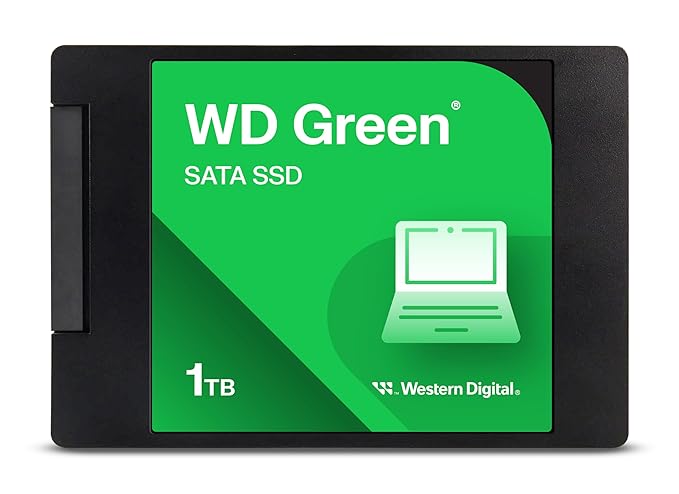

WD Green is the budget lane of the internal SSD market and the alternative to the Crucial BX500 when it is the cheaper of the two on the day you buy. Rated up to 545MB per second read, it delivers essentially the same transformation on an old machine: fast boots, instant application launches and no more freezing when the browser has twenty tabs open.
It runs cool and draws very little power, which on a laptop translates to a small but real gain in battery life over the mechanical drive it replaces. WD SSD Dashboard handles health checks and firmware. The trade against pricier drives is a shorter three-year warranty term paired with a lower endurance rating, which is irrelevant for normal use but worth noting if the machine is a workstation writing hundreds of gigabytes every week.
| Specification | Details |
|---|---|
| Capacity | 1TB |
| Type | Internal SATA SSD (2.5 inch) |
| Read speed | Up to 545 MB/s |
| Interface | SATA III |
| Software | WD SSD Dashboard |
| Warranty | 3 years |
Pros
| Cons
|
7. TOSHIBA Canvio Basics 1TB Portable External Hard Disk


Toshiba has kept the Canvio Basics deliberately plain, and that is the appeal. No software, no registration screen, no LED that glows through a drawer. Just a matte black hard disk that appears as a drive letter and holds a terabyte.
Against the similarly priced Seagate Expansion it wins on two counts: a two-year warranty instead of one, and an internal shock sensor with ramp loading that parks the read head when the drive is knocked. On a drive that gets carried between home and office, that is worth having. The one recurring complaint is the cable, which is short at roughly 45cm and leaves the drive dangling if your USB port is at the back of a desktop. A one-metre replacement cable solves it for very little.
| Specification | Details |
|---|---|
| Capacity | 1TB |
| Type | External mechanical HDD |
| Interface | USB 3.2 Gen 1 |
| Protection | Shock sensor and ramp loading |
| Cable | About 45 cm |
| Warranty | 2 years |
Pros
| Cons
|
8. SanDisk Extreme 1TB Portable SSD


When the drive has to keep up with work rather than just hold it, a portable SSD replaces the mechanical hard disk entirely. At up to 1050MB per second read this moves a 50GB folder in about a minute, against roughly ten on any hard disk in this list, and it is quick enough to run a video edit or a photo catalogue directly from the drive.
It is also the only drive here built for rough handling, with a rubberised shell, IP55 water and dust resistance and a carabiner loop for a bag strap. Five years of warranty is the longest on this page. The two honest caveats are cost, since a terabyte of SSD still costs several times a terabyte of spinning disk, and the need for a USB 3.2 Gen 2 port to see the rated speeds; on an older USB 3.0 laptop it will run at roughly 400MB per second, still fast, but not what you paid for.
| Specification | Details |
|---|---|
| Capacity | 1TB |
| Type | Portable SSD |
| Read speed | Up to 1050 MB/s |
| Water and dust | IP55 rated |
| Interface | USB 3.2 Gen 2 Type-C |
| Encryption | 256-bit AES |
| Warranty | 5 years |
Pros
| Cons
|
How to Choose the Right Hard Disk
Decide first whether you need internal or external
An internal drive replaces or supplements what is inside the machine and makes the computer itself faster. An external hard disk adds space you plug in and unplug. If the complaint is “my laptop is slow”, the answer is an internal SSD. If the complaint is “my laptop is full”, the answer is an external hard drive. Buying the wrong one is the most common mistake with this purchase.
For internal drives, check the slot before you buy
A 2.5 inch SATA SSD fits most laptops made before roughly 2018 and any desktop. An M.2 NVMe drive needs an M.2 slot on the board, and some slots accept only SATA M.2 rather than NVMe. Look up your exact laptop model number, or open the back panel and look, before ordering. A drive that does not fit is a return, not an upgrade.
Understand what a hard disk gives you that an SSD does not
Capacity per rupee, and nothing else. A 2TB mechanical hard disk typically costs about the same as a 500GB to 1TB SSD. For archives, photo libraries and backups that you rarely open, that trade is entirely worth it. For anything you actively work on, it is not.
Match capacity to the job, and overshoot slightly
For a backup drive, buy at least twice your computer internal storage. For an archive of photos or video, buy the biggest mechanical drive in budget, because 2TB costs far less per terabyte than 1TB. For an internal SSD, 512GB is workable and 1TB is comfortable if you install games or work with large media files.
Read the warranty, not just the price
Warranty terms in this category range from one year to five, and a hard disk that fails takes the data with it. SanDisk and Samsung offer five years on the drives here, WD and Crucial three, Toshiba two, Seagate Expansion one. On a drive holding irreplaceable files, paying a few hundred rupees more for two extra years is cheap insurance.
Encryption matters more than most buyers assume
An external hard disk holding scanned documents, bank statements or client work is a serious liability if it is lost. Drives with 256-bit AES hardware encryption, such as the My Passport and SanDisk Extreme, let you set a password that makes the data unreadable without it. This costs nothing extra in performance.
A hard disk is not a backup on its own
One copy on one drive is not a backup. The standard rule is three copies of anything important, on two different types of media, with one of them somewhere else. In practice for a home user that means the laptop, an external hard disk, and a cloud folder for the files that truly cannot be lost. A single drive can and eventually will fail.
Format correctly and eject properly
Most drives ship NTFS formatted for Windows and are read-only on a Mac until reformatted; exFAT works on both. Do that before copying data, because formatting erases it. And always use Safely Remove Hardware before unplugging a mechanical drive, since pulling it mid-write is the most common cause of a corrupted hard disk.
Frequently Asked Questions (2026)
Which is the best hard disk in India right now?
The WD Elements 2TB is the best external hard disk overall, offering the most capacity per rupee from a major brand along with the largest review base in the category. For an internal upgrade, the Crucial BX500 1TB SATA SSD is the pick for older laptops and desktops, while the Samsung 980 1TB NVMe is the choice for any machine with a free M.2 NVMe slot.
What is the difference between a hard disk and an SSD?
A hard disk stores data on spinning magnetic platters read by a moving head, which is why it is cheap per terabyte but slow and vulnerable to knocks. An SSD stores data in flash memory with no moving parts, making it roughly five to thirty times faster and far more durable, but several times more expensive for the same capacity. Use a hard disk for archives and an SSD for anything you actively work on.
How much does a good 1TB hard disk cost in India?
Pricing shifts often, so check the live listing on Amazon before deciding. As a general guide, an external mechanical 1TB drive is the cheapest option, a 2TB external costs meaningfully less per terabyte than 1TB, an internal 1TB SATA SSD sits above both, and a 1TB portable SSD or NVMe drive is the most expensive per terabyte.
Can I install an internal hard disk or SSD myself?
On most desktops and on laptops with a removable back panel, yes. A 2.5 inch SATA SSD is a screwdriver job, and cloning software like the free Acronis tool bundled with Crucial drives moves Windows across without a reinstall. Ultrabooks with soldered or sealed bodies are harder, and if your laptop is still under warranty, check whether opening it voids that cover.
How long does a hard disk last?
A mechanical hard disk in normal home use typically lasts three to five years, though many run far longer and some fail in the first year. SSDs generally outlast the machines they are installed in for ordinary use. Because failure is never predictable, keep anything important in at least two places rather than relying on any single drive.
Is an external hard disk better than cloud storage?
They solve different problems. An external hard disk gives you large capacity for a one-time cost with no internet needed, which suits photo and video archives. Cloud storage protects against theft, fire and drive failure because the copy is elsewhere, but costs a subscription and depends on your connection. The sensible setup for most people is a hard disk for bulk storage plus cloud for the files that truly cannot be lost.
Will an external hard disk work on both Windows and Mac?
Yes, once it is formatted as exFAT. Most drives arrive NTFS formatted, which macOS can read but not write to. Reformatting to exFAT takes a minute in Disk Utility on a Mac or Disk Management on Windows and lets both systems read and write freely. Format before copying data, because it erases the drive.
Related Guides
Best External Hard Drive in India | Best SSD External Hard Drive in India | Best External Hard Drive for Laptop | Best SSD Hard Drive in India | Best 2TB External Hard Drive in India
Conclusion
The right hard disk depends entirely on which problem you are solving. If the computer is full, the WD Elements 2TB is the best external hard disk in India for most people, with the strongest capacity per rupee and a review base no rival matches, and the WD My Passport 2TB is the version to buy if the data needs a password on it. On a tight budget, the Seagate Expansion 1TB and Toshiba Canvio Basics 1TB both do the job, with the Toshiba ahead on warranty and shock protection.
If the computer is slow rather than full, the fix is internal. The Crucial BX500 1TB SATA SSD is the safest upgrade for any older laptop or desktop with a 2.5 inch bay, the WD Green 1TB is the value alternative when it is cheaper on the day, and the Samsung 980 1TB NVMe is the drive to fit if your machine has a free M.2 NVMe slot. And when the drive has to keep pace with actual work rather than just store it, the SanDisk Extreme 1TB portable SSD is worth the premium. Whichever you choose, remember that one copy on one drive is not a backup.
Affiliate Disclosure: This post contains Amazon affiliate links. If you buy through them, we may earn a small commission at no extra cost to you.